As someone who has implemented accounting software for dozens of clients over the past three decades, I’m Irina – and I know what works and what doesn’t. Choosing the right accounting software can make or break your financial management experience as a small business owner. Xero has emerged as one of the most popular cloud-based accounting platforms, particularly for businesses that need collaboration features and strong inventory management. But is it the right choice for your business?
In this comprehensive review, I’ll walk you through the real advantages and limitations of Xero based on actual user experiences and hands-on testing. Whether you’re a solopreneur, small business owner, or growing company, you’ll get a clear picture of what Xero does well and where it falls short.
Let’s dive into an honest assessment of Xero to help you make an informed decision about whether this platform deserves a place in your business toolkit.
What is Xero?
Xero is a cloud-based accounting software platform designed for small to medium-sized businesses. Founded in New Zealand in 2006, it has grown to serve millions of users worldwide. Unlike traditional desktop accounting software, Xero operates entirely online, meaning you can access your financial data from anywhere with an internet connection.
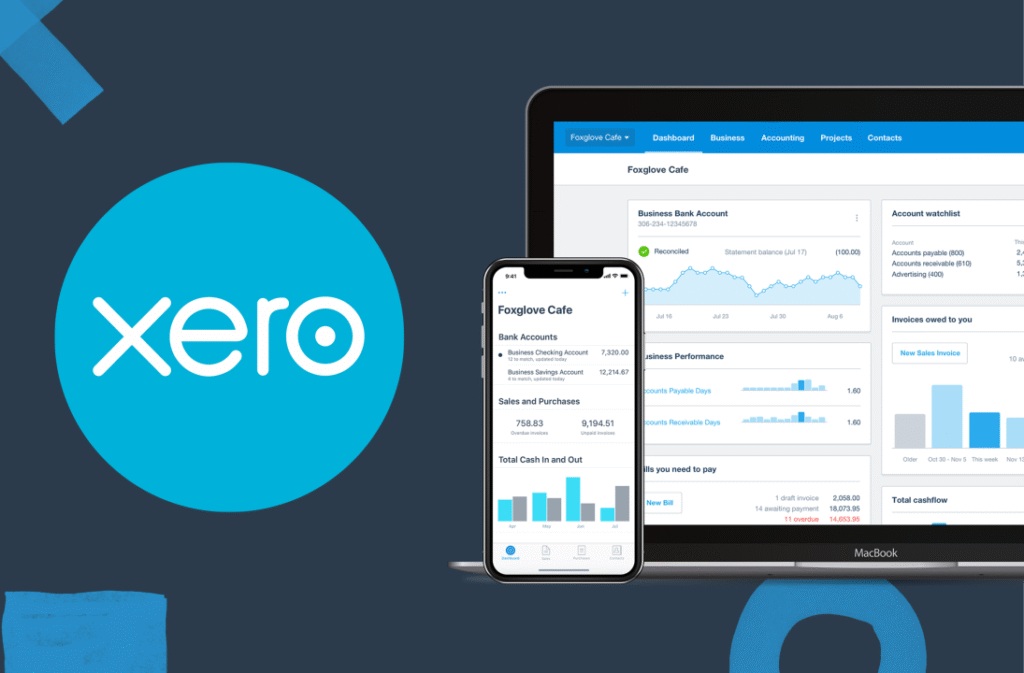
The platform is particularly known for its beautiful, intuitive interface and strong collaboration features. Xero allows unlimited users on all plans, making it ideal for businesses that work with accountants, bookkeepers, or have multiple team members who need access to financial information.
Xero handles all the essential accounting functions including invoicing, expense tracking, bank reconciliation, inventory management, and financial reporting. It also offers over 1,000 third-party integrations through its app marketplace, allowing you to connect Xero with other business tools you already use.
The Major Advantages of Xero
1. Unlimited User Access
One of Xero’s standout features is that all pricing plans include unlimited user access. This is rare in the accounting software world, where most competitors charge per user or limit the number of users on lower-tier plans.
This means you can invite your accountant, bookkeeper, business partner, and team members without worrying about additional costs. Each user can have customized permission levels, so you control exactly what financial information each person can view or edit. For businesses that value collaboration and transparency, this feature alone can justify choosing Xero over competitors.
2. Beautiful and Intuitive Interface
Xero consistently receives praise for its clean, modern interface. The dashboard is visually appealing without being cluttered, presenting your most important financial metrics in an easy-to-understand format. Charts and graphs make it simple to grasp your financial situation at a glance.
The navigation is logical, with clearly labeled sections for different accounting functions. Even users without accounting backgrounds often find Xero easier to navigate than more complex alternatives. The learning curve is moderate rather than steep, and the interface doesn’t overwhelm you with too many options on every screen.
3. Strong Bank Reconciliation
Bank reconciliation in Xero is streamlined and efficient. The software automatically imports transactions from your connected bank accounts and credit cards, then suggests matches with your existing records. The matching algorithm is intelligent and improves over time as it learns your patterns.
You can create rules to automatically categorize recurring transactions, saving significant time on monthly reconciliation. The reconciliation screen is well-designed, making it easy to review and approve matches quickly. Many users report that bank reconciliation, which used to take hours, now takes just minutes with Xero.
4. Excellent Inventory Management
For product-based businesses, Xero offers robust inventory tracking capabilities. You can monitor stock levels in real-time, set reorder points to get alerts when inventory runs low, and track inventory across multiple locations.
The system handles inventory valuation using multiple methods (FIFO, LIFO, or average cost), and you can track both finished goods and raw materials. Purchase orders integrate seamlessly with inventory, automatically updating stock levels when orders are received. This level of inventory functionality is uncommon in accounting software at Xero’s price point.
5. Multi-Currency Support
If you work with international clients or suppliers, Xero’s multi-currency features are comprehensive. You can create invoices in over 160 currencies, and the system automatically tracks exchange rates and handles currency conversions.
Foreign currency bank accounts are fully supported, and Xero can handle the complex accounting required when exchange rates fluctuate between invoice date and payment date. This makes Xero an excellent choice for businesses with international operations or ambitions to expand globally.
6. Mobile App Excellence
Xero’s mobile apps for iOS and Android are highly rated and genuinely functional, not just afterthoughts. You can create and send invoices, capture receipt photos for expense tracking, reconcile bank transactions, and check your financial dashboard from your phone or tablet.
The mobile experience is smooth and intuitive, with features specifically designed for on-the-go use. For business owners who travel frequently or work remotely, the mobile app provides real flexibility without sacrificing functionality.
7. Extensive Integration Ecosystem
With over 1,000 third-party integrations available through the Xero app marketplace, you can connect virtually any business tool to your accounting system. Popular integrations include payment processors like Stripe and PayPal, e-commerce platforms like Shopify, payroll systems, CRM tools, and project management software.
These integrations reduce manual data entry and ensure your financial information stays current across all your business systems. The app marketplace is well-organized, with user reviews and clear descriptions to help you find the right integrations for your needs.
8. Project Tracking Capabilities
Xero includes basic project tracking features that allow you to monitor profitability by project or job. You can track time and expenses against specific projects, then analyze which projects are most profitable.
While not as comprehensive as dedicated project management software, these features are sufficient for many service-based businesses. You can create quotes for projects, track progress, and invoice based on project milestones or time and materials.
The Limitations and Drawbacks of Xero
Limited Entry-Level Plan
While Xero offers three pricing tiers, the entry-level “Early” plan is quite restrictive. It’s limited to just 20 invoices and 5 bills per month, which many small businesses quickly outgrow.
This essentially pushes most users toward the mid-tier “Growing” plan, which costs significantly more. If you’re a very small business looking for affordable accounting software, this limitation can be frustrating. You might find yourself paying for features you don’t need just to get past the invoice limit.
Moderate Learning Curve
While Xero’s interface is attractive, it’s not necessarily the easiest accounting software for complete beginners. The system assumes some basic accounting knowledge, and new users often need time to understand concepts like chart of accounts, tracking categories, and journal entries.
The help documentation is comprehensive, but sometimes overly technical. New users frequently report needing several hours of exploration and tutorial-watching before feeling comfortable with the platform. If you have zero accounting experience, you might find alternatives like FreshBooks or Wave more immediately accessible.
Customer Support Quality Varies
Xero’s customer support is a common pain point in user reviews. Support is primarily provided through email and online chat, with no phone support available for most regions. Response times can be slow, especially during busy periods, and the quality of support varies significantly.
Many users report getting generic responses that don’t address their specific issues, requiring multiple back-and-forth exchanges to resolve problems. For a platform that positions itself as premium accounting software, the support experience often falls short of expectations. Small businesses that need hand-holding during setup may find this frustrating.
No Built-in Payroll in the US
While Xero includes payroll features in some countries like the UK, Australia, and New Zealand, US users must integrate with third-party payroll services. This adds complexity and additional costs to your accounting setup.
Popular payroll integrations like Gusto work well with Xero, but you’ll need to manage two separate platforms and ensure data syncs correctly between them. For businesses with employees, this lack of native payroll can be a significant disadvantage compared to all-in-one solutions like QuickBooks Online.
Time Tracking Limitations
While Xero includes basic time tracking, it’s quite limited compared to specialized time tracking tools or even some competitors. The time tracking interface is functional but not particularly intuitive, and it lacks advanced features like automated time capture or detailed productivity analytics.
Many Xero users end up integrating third-party time tracking tools, which means additional costs and potential sync issues. If time tracking is central to your business model, you might find Xero’s native capabilities insufficient.
Reporting Could Be More Robust
Xero offers a solid selection of standard financial reports including profit and loss, balance sheet, cash flow statements, and various management reports. However, the customization options for reports are somewhat limited compared to more advanced accounting platforms.
Creating custom reports often requires exporting data to Excel and manipulating it there, which defeats the purpose of having cloud-based software. Power users who need highly customized reporting might find Xero’s options restrictive. The report layouts are also fairly rigid, giving you limited control over formatting and presentation.
Price Increases Over Time
Xero has historically increased its subscription prices periodically, and existing customers aren’t always grandfathered into old pricing. This means your monthly costs may increase over time without any enhancement to features or service.
While the price increases are usually modest, they can be frustrating for small businesses on tight budgets. The lack of price protection for loyal, long-term customers is a common complaint in user reviews.
No Mileage Tracking
Unlike some competitors, Xero doesn’t include built-in mileage tracking for vehicle expenses. This is a notable omission for businesses that frequently travel for work and need to track deductible mileage.
You’ll need to use a third-party app or manually track and enter mileage, which adds extra steps to your workflow. For sole proprietors and small businesses where mileage is a significant expense category, this limitation can be inconvenient.
Xero Pricing Breakdown
Understanding Xero’s pricing structure helps you evaluate whether it fits your budget:
Early Plan – $25/month
- 20 invoices and quotes per month
- 5 bills per month
- Reconcile bank transactions
- Capture bills and receipts with Hubdoc
- Short-term cash flow and business snapshot
This plan works only for very small businesses or those just starting out. Most businesses quickly outgrow these limits.
Growing Plan – $55/month
- Unlimited invoices and quotes
- Unlimited bills
- Bulk reconcile transactions
- Manage projects
- Claim expenses
This is the most popular plan and suitable for most small businesses. The jump from $15 to $42 is significant, but you get meaningful additional functionality.
Established Plan – $90/month
- Everything in Growing plan
- Multi-currency accounting
- Project cost tracking
- Analytics Plus reports
- Batch payments and payment services
This plan is designed for established businesses with more complex needs, particularly those dealing with multiple currencies or requiring advanced analytics.
All plans include unlimited users, which can make even the higher-tier plans cost-effective if you have multiple team members who need access.
Who Should Use Xero?
Xero is an excellent fit for:
Businesses with Multiple Users: The unlimited user access makes Xero perfect for companies where several people need to access financial data, including business partners, accountants, and bookkeepers.
Product-Based Businesses: The strong inventory management features make Xero ideal for retail, e-commerce, or wholesale businesses that need to track stock levels and costs.
International Businesses: Multi-currency support and global capabilities make Xero a smart choice for businesses with international clients, suppliers, or operations.
Growing Companies: Businesses that expect to scale will appreciate Xero’s robust features and scalability. You won’t quickly outgrow the platform.
Tech-Savvy Business Owners: If you’re comfortable learning new software and don’t need extensive hand-holding, Xero’s powerful features will serve you well.
Who Should Look Elsewhere?
Xero might not be the best choice for:
Complete Accounting Beginners: If you have zero accounting knowledge and want the simplest possible interface, FreshBooks or Wave might be easier starting points.
Micro-Businesses on Tight Budgets: The $42/month Growing plan (which most users need) is more expensive than some alternatives. Wave offers free accounting, and FreshBooks has more affordable entry-level options.
US Businesses Needing Payroll: Without built-in US payroll, you’ll need to integrate and pay for separate payroll software, which adds complexity and cost.
Businesses Requiring Extensive Support: If you expect to need frequent, high-quality customer support, platforms with better support reputations might be preferable.
Xero vs. The Competition
QuickBooks offers more comprehensive features including built-in US payroll, but charges per user. Xero’s unlimited users and cleaner interface give it an edge for collaborative teams. QuickBooks has superior reporting and a steeper learning curve.
Xero vs. FreshBooks
FreshBooks is more user-friendly for complete beginners and excels at invoicing and time tracking. Xero offers stronger inventory management and bank reconciliation. FreshBooks is better for service businesses, while Xero suits product-based businesses.
Xero vs. Wave
Wave is free for basic accounting but charges for payments and payroll. Xero offers more robust features, better reporting, and stronger inventory management. Wave works for very small businesses with simple needs; Xero supports growing companies with complex requirements.
Tips for Getting Started with Xero
If you decide to try Xero, here are some recommendations:
Take Advantage of the Free Trial: Xero offers a 30-day free trial. Use this time to actually work with your real business data, not just explore features. This hands-on experience will reveal whether Xero suits your workflow.
Invest Time in Initial Setup: Proper chart of accounts setup and bank connections at the beginning save countless hours later. Consider hiring a Xero-certified accountant for setup assistance if you’re not confident.
Learn the Keyboard Shortcuts: Xero has numerous keyboard shortcuts that speed up common tasks. Learning even a handful of these dramatically improves efficiency.
Explore the App Marketplace Early: Identify any integrations you’ll need and set them up from the start. This ensures data flows correctly from day one.
Use Bank Rules Liberally: Creating rules for recurring transactions automates significant portions of your bookkeeping. Spend time setting these up initially for long-term time savings.
Connect with Your Accountant: If you work with an accountant or bookkeeper, invite them to your Xero account early. Their expertise can help you leverage Xero’s features more effectively.
Final Verdict
Xero is a powerful, well-designed accounting platform that excels at collaboration, inventory management, and international capabilities. The unlimited user access is genuinely valuable, and the interface is among the most attractive in the industry.
However, it’s not the cheapest option, and the customer support doesn’t match the premium positioning. The entry-level plan is too limited for most businesses, pushing users toward the $42/month Growing plan. For US businesses, the lack of built-in payroll is a notable gap.
If you’re a growing business with multiple stakeholders who need financial access, particularly if you manage inventory or work internationally, Xero is definitely worth considering. The platform will scale with your business and won’t become a limitation as you grow.
For complete beginners or very small businesses on extremely tight budgets, you might find FreshBooks more approachable or Wave more affordable, at least initially.
Want to see if Xero is right for your business? Take advantage of their 30-day free trial to test drive the platform with your actual business data. This hands-on experience will quickly reveal whether Xero’s strengths align with your specific needs.
The best accounting software is the one you’ll actually use consistently. Xero makes that easy with its attractive interface and solid features, assuming you’re willing to invest the time to learn the platform and can justify the monthly cost for your business.
This was a pretty good assessment of the software. I feel I need to point out that I was kind of confused when I got to the pricing section of the article. In the comments under Growing Plan, listed at $55 per month, you have: The jump from $15 to $42 is significant, but you get meaningful additional functionality. you mention this $42 price also in the Micro-Businesses on Tight Budgets section where it says: The $42/month Growing plan (which most users need) is more expensive than some alternatives. Did the software price change?
Thanks for the kind words! WHEN, not if—that’s the right attitude! ????
QuickBooks definitely makes sense for your employer’s 30-person team. For your solo WA business, Xero is great, but here’s something to consider: FreshBooks might be an even better fit for solo freelancers and service-based businesses. It’s simpler, cheaper, and has better invoicing tools for solopreneurs.
My suggestion? Try both free trials when you’re ready—FreshBooks for 30 days and Xero for 30 days. See which feels more natural for your workflow.