Real-World Experience, Practical Tips, and What You Need to Know
By Irina Greenke · Independent accounting software reviewer
Updated: March 2026
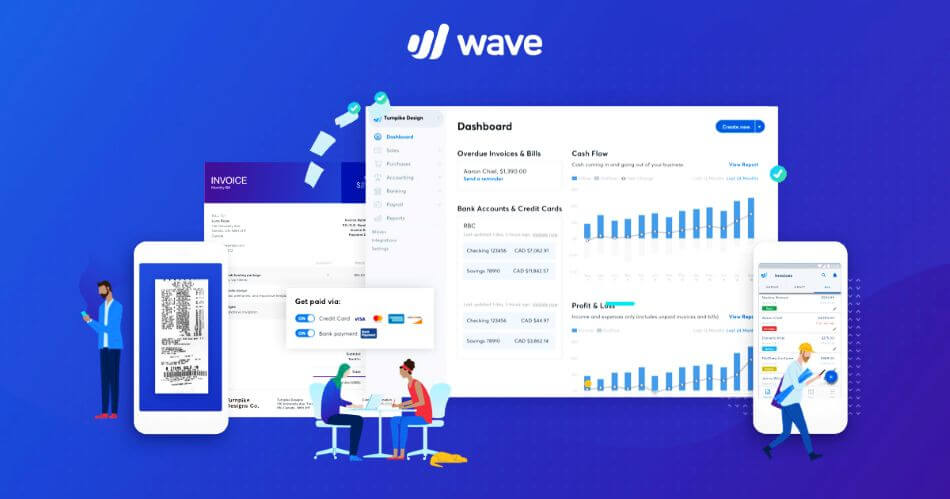
I’ve been using Wave Accounting for three years, both for my own freelance accounting practice and for several micro-business clients. When people ask me about Wave, my answer is always the same: it’s the best free accounting software available, but ‘free’ comes with real tradeoffs.
This isn’t a marketing piece—it’s an honest assessment from someone who lives in this software daily. I’ll share what works, what doesn’t, and the specific situations where Wave makes sense.
What Is Wave Accounting?
Wave is cloud-based accounting software designed for freelancers and very small businesses (under 10 employees). It offers a free Starter Plan with core accounting features and a Pro Plan at $16/month with automation tools.
Key fact: Wave was acquired by H&R Block in 2019 for $537 million and serves over 2 million small businesses. In 2023-2024, they shifted from being completely free to introducing paid features for advanced functionality.
What Wave Offers For Free
The Starter Plan includes:
- Unlimited invoicing – Create and send as many invoices as you need
- Income and expense tracking – Manual entry of all transactions
- Financial reports – Profit & Loss, Balance Sheet, Cash Flow
- Chart of Accounts – Customizable for your business type
- Double-entry accounting – Professional-grade bookkeeping system
Real example: One of my clients is a freelance graphic designer billing $40,000/year. She uses only the free Starter Plan—manually enters her 15-20 monthly transactions, sends invoices to clients, and generates her P&L for tax time. Total cost: $0. She saves $456/year compared to QuickBooks Simple Start.
What Costs Extra
Pro Plan ($19/month or $190/year):
- Automatic bank transaction imports (otherwise manual entry required)
- Automated receipt scanning with OCR
- Unlimited users (Starter is single user only)
- Automated payment reminders
- First 10 payment transactions per month are fee-free
Other Paid Add-ons:
- Payment processing: 2.9% + $0.60 (credit cards) or 1% ($1 minimum) for bank payments
- Payroll: $20-40/month base + $6 per employee
- Receipt scanning: $8/month (or included in Pro)
Who Wave Is Best For
✓ Perfect For:
- Freelancers and solopreneurs with under 50 transactions per month
- Service-based businesses (consultants, coaches, designers, writers)
- Businesses under $100K revenue with simple accounting needs
- People handling their own bookkeeping without external accountants
Real example: I have a client who runs a small consulting business with $75K annual revenue. He has about 30 transactions per month (mostly invoices and business expenses). He spends 30 minutes weekly manually entering transactions in Wave’s free plan. He’s saved over $1,200 in two years by not paying for QuickBooks.
Pro tip: If you’re comfortable with 30-60 minutes of manual data entry weekly, the free Starter Plan is unbeatable. Set aside 30 minutes every Friday afternoon to enter the week’s transactions—it becomes routine quickly.
✗ NOT Suitable For:
- Product-based businesses – Wave has NO inventory management
- E-commerce businesses – Limited integrations with Shopify and other platforms
- Businesses over $100K revenue – You’ll outgrow Wave’s capabilities
- Companies needing accountant collaboration – Many accountants refuse to work with Wave (more on this below)
What to Know Before Using Wave Long Term
Here’s something Wave won’t tell you: many professional accountants and bookkeepers refuse to work with Wave clients. They’re familiar with QuickBooks and don’t want to learn a different system.
A real scenario I’ve seen: A client started with Wave, then needed to hire a bookkeeper as their business grew. Three bookkeepers declined the work because they only use QuickBooks. The client eventually hired someone less experienced who would work with Wave, and that person made mistakes that cost $800 to fix.
My advice: If you plan to outsource your bookkeeping within 1-2 years, ask potential accountants upfront if they work with Wave. If they all say no, you might be better off starting with QuickBooks despite the higher cost.
What Works Well In Wave
1. Actually Free Core Features
This isn’t a 30-day trial or a crippled ‘freemium’ version. The Starter Plan gives you real, functional double-entry accounting. I’ve had clients use it for three years without paying a dollar. That’s legitimately saving them $1,000+ annually.
2. Simple, Clean Interface
Wave doesn’t overwhelm you with features you don’t need. My non-accountant clients can figure it out in an hour. Compare that to QuickBooks, where I spend 2-3 hours training new users.
3. Professional Invoicing
The invoicing feature is better than many paid alternatives. You can:
- Customize with your logo and branding
- Send automated payment reminders (Pro plan)
- Track which invoices were viewed and paid
- Accept online payments (with transaction fees)
4. Multi-Business Support
I manage three businesses in one Wave account at no extra charge. QuickBooks would charge me separately for each business—that’s a $114-345/month difference.
Where Wave Has Limitations
1. Limited Customer Support for Starter Plan
If you’re on a Starter Plan, you cannot contact a human for help. You’re limited to help articles and an AI chatbot. When clients have problems, I often can’t get answers quickly.
Real Example: A client’s bank feed stopped syncing. With QuickBooks, I’d call support and fix it in 20 minutes. With Wave’s free plan, we spent three days troubleshooting through help articles before manually entering transactions as a workaround.
2. Manual Entry Required (Free Plan)
The free Starter Plan doesn’t import bank transactions automatically. You must manually enter every transaction. For businesses with 50+ monthly transactions, this becomes tedious. The Pro plan ($16/month) adds automatic imports, but then you’re paying for what other software includes free.
3. No Inventory Tracking
If you sell physical products, Wave won’t work. Period. There’s no inventory management—no stock tracking, no COGS calculations, no product SKUs. This is a dealbreaker for retail, e-commerce, or wholesale businesses.
4. Limited Integrations
Wave integrates with PayPal, Stripe, and a few others—but that’s it. No Shopify integration, no third-party payroll, limited CRM connections. If you need your accounting software to talk to other business tools, Wave will disappoint.
Practical Tips from 3 Years of Using Wave
Setting Up Your Chart of Accounts
Wave provides a default Chart of Accounts, but customize it for your specific business:
- Delete accounts you won’t use – Keep it simple. If you don’t have inventory, delete those accounts
- Add specific expense categories – I add ‘Software Subscriptions,’ ‘Marketing,’ ‘Client Meals’ for better tracking
- Use subcategories sparingly – Too many categories make reports messy
Making Manual Entry Bearable
If you’re using the free plan without automatic imports:
- Schedule a weekly ‘accounting hour’ – Friday afternoons work well. Don’t let transactions pile up
- Keep receipts in one place – I use a folder on my phone and email them to myself weekly
- Use recurring transactions – Set up recurring entries for monthly subscriptions (software, rent, etc.)
Getting Paid Faster
- Use the Pro plan if you invoice frequently – Automated payment reminders alone are worth $16/month
- Enable online payments selectively – The 2.9% fee is expensive. I only enable it for clients who pay faster with cards
- Set payment terms clearly – ‘Net 15’ or ‘Due upon receipt’—make expectations clear on every invoice
Tax Time Preparation
- Run your P&L quarterly – Don’t wait until April. Review profits quarterly to avoid tax surprises
- Export reports to PDF – Save year-end P&L and Balance Sheet as PDFs for your records
- Use H&R Block integration – Wave connects directly to H&R Block for easier tax filing
When to Upgrade to Pro (or Switch to QuickBooks)
Upgrade to Wave Pro ($19/mo) when:
- You’re spending too much time entering transactions manually
- You want automatic bank transaction imports
- You send invoices regularly and want automatic payment reminders
- You want receipt scanning instead of saving receipts manually
Switch to QuickBooks when:
- Your business is growing and bookkeeping is no longer simple
- You want to work easily with an accountant or bookkeeper
- You sell physical products and need inventory tracking
- You want built-in payroll (U.S.)
- You need stronger integrations with other business tools
Scenario: Freelance consultant with $60K annual revenue
| Feature | Wave Starter | QuickBooks |
| Monthly cost | $0 | $38 |
| Annual cost | $0 | $456 |
| Your time investment | 1 hr/week manual entry | 15 min/week |
The verdict: If your time is worth less than $18/hour, Wave’s free plan saves money. If your time is worth $50+/hour, the 45 minutes saved weekly with QuickBooks ($38 cost) might be worth it.
Final Recommendation
After three years of using Wave with multiple clients, here’s my honest advice:
Start with Wave’s free Starter Plan if:
- You’re a freelancer or solopreneur under $75K revenue
- You don’t sell physical products (no inventory needed)
- You’re willing to manually enter transactions weekly
- You handle your own bookkeeping
Skip Wave and use QuickBooks if:
- You sell physical products and need inventory tracking
- You’re already above $100K revenue
- Your accountant requires QuickBooks
- You need extensive third-party integrations
Wave isn’t perfect. The lack of customer support frustrates me. The accountant’s resistance is real. The manual data entry on the free plan is tedious.
For the right user—a freelancer or micro-business with simple needs—Wave delivers genuine value. It’s professional double-entry accounting for $0. That’s extraordinary.
I’ll keep using Wave for my own practice and recommending it to appropriate clients. Just know what you’re getting into, understand the tradeoffs, and have realistic expectations.
This is pretty good though. I didn’t even know it existed.
I think that invested time in doing manual work is worth it. One develops new skills and has everything under their own control. I’d love to use this if I end up doing my life coaching ministry.
It sounds worth it. The price is exceptional and it all falls into place. Who wouldn’t like to invest time in doing this as a consultant, freelancer etc.
Thanks for the review!
Thank you for your thoughtful comment! I agree — understanding the basics first can really help people feel more confident with their bookkeeping. I’m glad you found the review helpful, and I wish you success with your future coaching work!